General Settings

The setting tab is where you set your pay cycle and other settings for the app functions. Your selected payment cycle will define the home page summary groups and also the divider headers in the payment list. You can select from Weekly, fortnightly or Month pay cycles. There is no save on this screen as all settings are instantly applied.
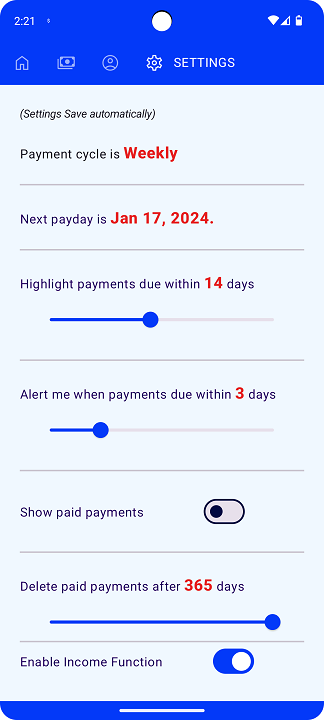
Payment Cycle
Holds your payment cycle, the app will use this information to provide groups to suit.
Payment cycle is used to set your payment cycle frequency, weekly, fortnightly or monthly.
Next payday is used to set your next date of your payday or main income.
once this value is set, it will automatically update as a new pay date arrives and does not require updating.
Display and Alert Settings
Controls the display option and notification settings.
Show paid payments
This will toggle if the payment list shows you past paid payments or hides them from view.
Alert me when payment is due If you allow app notifications, This will alert you when payments within the selected value of days.
Highlight payment due This will change the color in the payment list to stand out based on the days until due.
Application Functionality
Controls what functions in the app you would like to use.
Enable Income Feature This will create an 'income' payee for you to create payments to you. When these income payments exist, the home screen will provide you with the amount you have for the pay cycle remaining.
Income enabled: 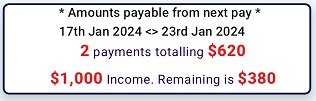
Income Disabled: 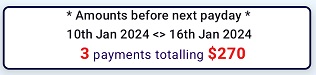
Enable Account Function This will provide an Account item in the navigation bar at the top and allow you to create accounts and assign them to payments.
Enable Category Function This will provide a Categories item in the navigation bar at the top and allow you to create categories and assign them to payments.
Delete paid payments after This will set paid payments to be deleted from the database once the time has elapsed.